Modern Marketing ATS Resume Template
If you want to make your resume professional, easy to read, and ATS friendly, this article shows you how to use this template correctly, how to check your resume with online tools, and which tricks actually help you pass ATS filters. At the end of the article, you'll see how to use this template completely for free. So read till the end and don't forget to share.
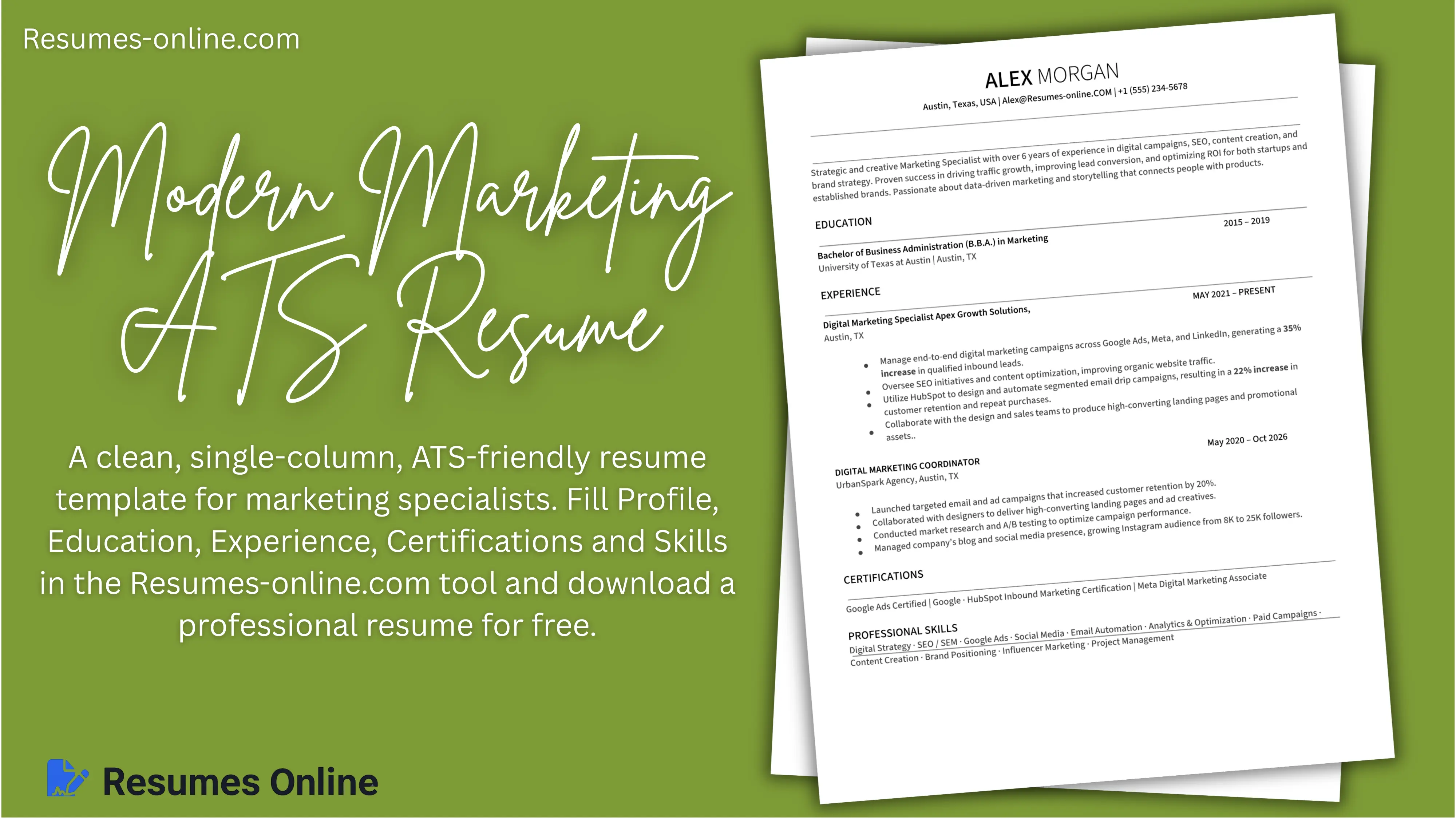
The first thing to understand is this: a good ATS friendly resume isn't about design. It's about content. The system doesn't care how pretty it looks. It cares how your experience and skills match the job description. That is why the Modern Marketing ATS Resume uses a clean, single-column layout with no photo, no icons, no graphics and no columns. Everything is plain, structured text that an ATS can read without errors.
Who should use this template, and for whom is it perfect?
| Profession Type | Why is it suitable? |
|---|---|
| Marketing specialists (digital, SEO, content, brand) | Layout built around campaigns, results and certifications |
| Sales and business development professionals | Action + Result bullets showcase numbers |
| Project managers and coordinators | Skills line supports planning, agile, budgeting keywords |
| Job seekers applying through online portals | Maximum ATS compatibility |
| Freshers with courses | Certifications section (Google, HubSpot, Meta) adds weight |
Best Use Case: Sales Executive, Business Development Manager, Account Representative, CRM Specialist, Client Relationship Manager, Retail/Corporate Sales roles
Step 1: Prepare Before Filling the Template
Before filling out your template, let's prepare everything properly and use the Resumes-online.com resume template tool.
Open LinkedIn and find a job you're genuinely interested in. For example, a marketing specialist role. Copy the job description and go to a site like a word cloud generator. Paste the text and you'll get a cloud of keywords, such as sales, AI, marketing. These are the words ATS will look for in your resume.
If at least 60 to 70% of the keywords match, your chances of passing the ATS filter triple. Some HR experts argue about how important this is, but in practice, it's better to include them than not. Just don't overdo it. If the system sees the same word 15 times, it can flag it as keyword stuffing and automatically discard your resume.
Step 2: Fill the Template Section by Section
Header (Name and Contact)
- preview-name → your full name (e.g., ALEX MORGAN)
- preview-location, preview-email, preview-phone → city, email and phone in one line, separated by "|"
Profile / Professional Summary (preview-summary)
This is the business card of your resume. It should show who you are and why you should be hired in two to three lines. No generic "I'm responsible and goal oriented", only facts.
If you have less experience, focus on skills: Motivated marketing specialist skilled in SEO, content strategy, and paid advertising. The key is to show direction, not years of experience.
Education (repeatable block)
Simple and clean. Include the full name of the school, years, and degree. ATS often looks for exact phrasing like Bachelor of Science or Master of Arts.
- edu-degree → degree (e.g., Bachelor of Business Administration (B.B.A.) in Marketing)
- edu-school → university and city
- edu-date → years (e.g., 2015 – 2019)
Experience (repeatable block)
This is the core of your resume, and where most people go wrong. Each bullet should answer: "What did you do and what was the result?"
- Bad: Responsible for social media.
- Good: Manage social media channels increasing engagement by 40% in 6 months.
Formula: Action + Result. If you don't have exact numbers, highlight the process: Created weekly content plans and optimized ad creatives based on analytics insights. Also use action verbs: improved, achieved, optimized, launched. It immediately makes you sound competent.
- exp-title → job title
- exp-company → company and city
- exp-date → duration (e.g., MAY 2021 – PRESENT)
- exp-desc → 3–4 bullets in Action + Result format
Certifications
Once you've shown your achievements, it's time to back them up. The certification section adds weight. Even online courses count. ATS picks up the names of companies like Google, HubSpot, and Meta. HR sees them too and knows you keep your skills up to date.
Skills (preview-skills-container)
Don't make a long list of 50 words. 10 to 12 relevant skills are enough. If you're applying for different roles, make separate versions of your resume.
- For marketing: SEO, analytics, paid ads, email automation, copywriting
- For project management: budgeting, planning, communication, agile, Jira
Step 3: Check Your Resume in ATS Tools
Once your template is filled, it's time to check how it performs in ATS. Use JobScan, Resume Worded, or Resume Match. Upload your resume and the job description. Within a minute, you'll get a report: keyword match, structure, tone, and errors. If your score is above 75%, you're in great shape. And that's it. Your professional, ATS-ready resume is complete.
How to use a Traditional Fresher Resume Template for your resume
How to Fill Out Our HTML Tool (Field-by-Field Guide)
1. Header Section
- preview-name → Your full name (e.g., "DAVID MILLER")
- preview-title → Your current designation (e.g., "Sales Executive")
2. Contact Fields
- preview-phone → Phone number
- preview-email → Email address
- preview-website/social → Website or LinkedIn/Portfolio link
3. Professional Summary
- preview-summary → Write your overall experience, skills, and strengths in 3-4 lines (e.g., "Results-driven Sales Executive with experience...")
4. Education (Repeatable Block)
- edu-date → Year range (2018–2022)
- edu-school → University/College name
- edu-degree → Degree/Specialization (e.g., "BBA in Marketing")
5. Certifications (Repeatable List)
- Add the name of each certificate on a separate line
- Use the "+ Add" button to add as many certificates as you like
6. Achievements (Repeatable List)
- Write only result-oriented points here — include numbers/%
- Example: "Exceeded quarterly sales targets by 15%", "Onboarded 30+ new clients in one year"
7. Work Experience (Repeatable Block)
- exp-date → Duration (e.g., "2026 – Present")
- exp-company → Company name
- exp-title → Job Role/Designation
- exp-desc → 4-6 bullet points — combine responsibilities and results
8. Projects (Repeatable Block)
- project-date → Year
- project-company → Client/Company name
- project-title → Project name
- project-desc → 2 bullet points — what was done and the outcome achieved
Thank you so much for reading. I hope this helped you make your resume stronger and more professional. Good luck with your job search!