Professional Executives Resume Template
Whenever you need a resume with a photo, a professional design comes to mind, and this professional executive resume template is the best option, easily customizable for your career needs.
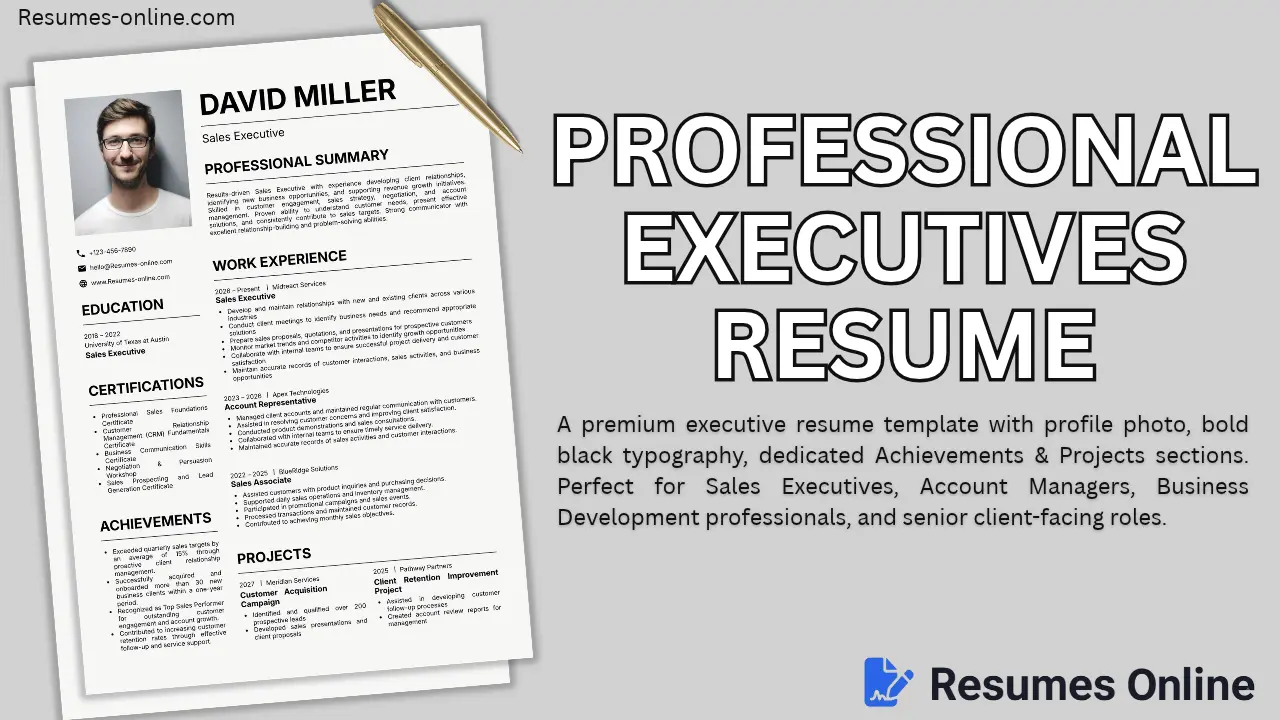
This template name is "Professional Executives Resume Template" because its design layout blends photos, striking fonts, and result-oriented sections to give a high-end, self-assured vibe for top-level sales and business positions.
Who should use this template, and for whom is it perfect?
| Profession Type | Why is it suitable? |
|---|---|
| Sales Executives / Account Managers | The whole template is focused on sales; the achievements section emphasizes targets and numbers. |
| Business Development Professionals | The "Projects" section (customer acquisition, client retention) showcases client-facing work. |
| Client-Facing Roles (BD, CRM, Relationship Managers) | Photo included hone se personal trust aur professionalism dikhta hai. |
| Senior Executives with Certifications | A separate "Certifications" section is ideal for listing CRM, negotiation, and sales training. |
| Multi-Skill Candidates | Certifications + Projects + Additional Details — flexibility to organize everything into separate sections. |
| Result-Oriented Professionals | There is already space in the "Achievements" section to add percentages and numbers like "15% target exceeded" and "30+ clients onboarded". |
Best Use Case: Sales Executive, Business Development Manager, Account Representative, CRM Specialist, Client Relationship Manager, Retail/Corporate Sales roles.
Professional Executives Resume Template Key Features
You will find all these features in this Resume Template, as follows:
- Profile Photo Section: Print-friendly, ATS-compatible, and simple.
- Bold Impact Typography: Name and section headings in a large, bold black font — instantly grabs the recruiters attention.
- Separate Projects Section: The projects are shown in a two-column layout to highlight client work and campaigns.
- Dedicated Achievements Section: A dedicated section for showing measurable results (with numbers and percentages) rather than just responsibilities.
- Personal Details Section: A feature often missing from other templates but included here, allowing you to customize it as needed.
- Multi-Job Work Experience Timeline: Organized clearly with company, role, and duration (most recent first).
- Easy to Edit: No complex table/grid or fix column detail structure and easy to editable. Simple Word document like structure.
- Vertical Spacing Control: Automatically adjust the gap between sections to avoid empty space at the end of the page.
- A4 Print-Ready Format: Perfectly sized for direct PDF export or printing.
- Fully Responsive: Looks great on mobile previews and includes zoom-in/zoom-out functionality.
- Certifications Block: Professional courses and certificates are listed separately from formal education, which enhances credibility.
- ATS-Friendly Structure: Simple black text, minimal graphics (just a photo) — no issues with ATS parsing.
How to use this Template for your resume
How to Fill Out Our HTML Tool (Field-by-Field Guide)
1. Header Section
- preview-photo → Upload your professional headshot (formal attire, plain background)
- preview-name → Your full name (e.g., "DAVID MILLER")
- preview-title → Your current designation (e.g., "Sales Executive")
2. Contact Fields
- preview-phone → Phone number
- preview-email → Email address
- preview-website/social → Website or LinkedIn/Portfolio link
3. Professional Summary
- preview-summary → Write your overall experience, skills, and strengths in 3-4 lines (e.g., "Results-driven Sales Executive with experience...")
4. Education (Repeatable Block)
- edu-date → Year range (2018–2022)
- edu-school → University/College name
- edu-degree → Degree/Specialization (e.g., "BBA in Marketing")
5. Certifications (Repeatable List)
- Add the name of each certificate on a separate line (e.g., "CRM Fundamentals Certificate").
- Use the "+ Add" button to add as many certificates as you like.
6. Achievements (Repeatable List)
- Write only result-oriented points here — include numbers/%.
- Example: "Exceeded quarterly sales targets by 15%", "Onboarded 30+ new clients in one year".
7. Work Experience (Repeatable Block)
- exp-date → Duration (e.g., "2026 – Present")
- exp-company → Company name
- exp-title → Job Role/Designation
- exp-desc → 4-6 bullet points — combine responsibilities and results
8. Projects (Repeatable Block — 2 Columns)
- project-date → Year
- project-company → Client/Company name for whom the work was done
- project-title → Project name
- project-desc → 2 bullet points — what was done and the outcome achieved